Apps and Security
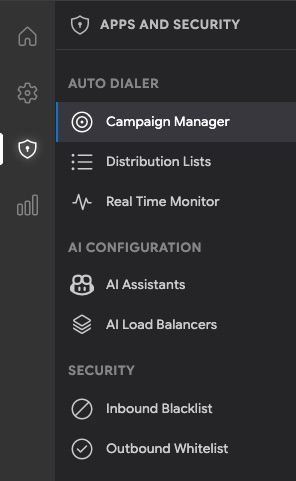
The Apps and Security section of the sidebar holds what builds on the core PBX: automated outbound dialing, AI voice agents, call tracking for marketing campaigns, and the rules that block inbound callers and limit outbound destinations.
The Auto Dialer and AI Configuration pages can be seen by Owners, PBX Admins and Reporters; creating and changing them needs the Owner or PBX Admin role. Each page's Permissions section gives the exact rules.
Pages in this section
In the order of the sidebar.
Auto Dialer
The Auto Dialer runs outbound calling campaigns from distribution lists, with scheduling, pacing, answering-machine detection and a live monitor. It is read-only for Reporters.
| Page | What it does |
|---|---|
| Campaign Manager | Create, edit, start, pause, resume, archive and delete auto-dialer campaigns |
| Distribution Lists | Upload the numbers a campaign dials, map CSV columns, and assign the list to a campaign |
| Real Time Monitor | Live view of active and paused campaigns, calls in progress, dispositions and dialer health |
AI Configuration
| Page | What it does |
|---|---|
| AI Assistants | Connects callers to an AI voice agent at one of 47 providers (42 over SIP, 5 over WebSocket), plus a Dummy Test provider for checking routes |
| AI Load Balancers | Spreads calls across several assistants (round robin, priority or percentage), fails over between them and falls back to a person or menu |
Call Tracking
| Page | What it does |
|---|---|
| Dashboard | KPIs, call volume and conversion trends, top campaigns and sources, and CSV export of attributed calls |
| Campaigns | Assign tracking numbers (DIDs) to marketing campaigns, route their inbound calls, and set conversion rules |
| Sessions | Every attributed call, with its campaign, source and conversion status, filtered by number, date and conversion |
| DNI Snippet | Swaps the phone number shown on your website so each visitor sees the tracking number for their marketing source |
| Integrations | Organization-wide Google Ads and Meta credentials for uploading converted calls |
Security
| Page | What it does |
|---|---|
| Inbound Blacklist | Blocks unwanted callers by exact number, prefix or wildcard, on all phone numbers or only some, before the call is routed |
| Outbound Whitelist | Decides which external destinations extensions may call, through which trunk, and with which caller ID |
AI voice agents
An AI assistant is a destination like an extension or a ring group: phone numbers, IVR options, business hours, queue fallbacks and campaigns can send callers to it. The provider decides how the call is handed over:
- SIP: OPBX dials the provider's service with the agent's phone number.
- WebSocket: OPBX streams the call audio to the provider's endpoint.
An AI load balancer puts several assistants behind one destination, so one failing provider does not stop the line.
Auto Dialer
The Auto Dialer places outbound calls for a campaign:
- campaigns with schedules and time windows;
- distribution lists uploaded as CSV;
- pacing by concurrent calls and calls per second;
- answering-machine detection;
- a real-time monitor with live statistics.
Answered calls are connected to an AI assistant or an AI load balancer (or hung up, for testing). Step-by-step screens: Campaign Manager, Distribution Lists and Real Time Monitor.
Related modules
- Phone Numbers — route numbers to assistants and load balancers
- Analytics — which report answers which question, including the Auto Dialer Real Time Monitor and Inbound Blacklist counts