Sessions
The Call Tracking Sessions page lists every attributed call, with the campaign and source it was attributed to and whether it converted. Open it from Call Tracking → Sessions.
Purpose
Use this page to:
- Review individual attributed calls across all campaigns
- Filter sessions by date range and conversion status
- Find the calls from or to a specific number
For totals, trends, and CSV export, use the Dashboard.
Sessions List
Each row shows the called number, campaign, source/medium, duration, disposition, and conversion status.
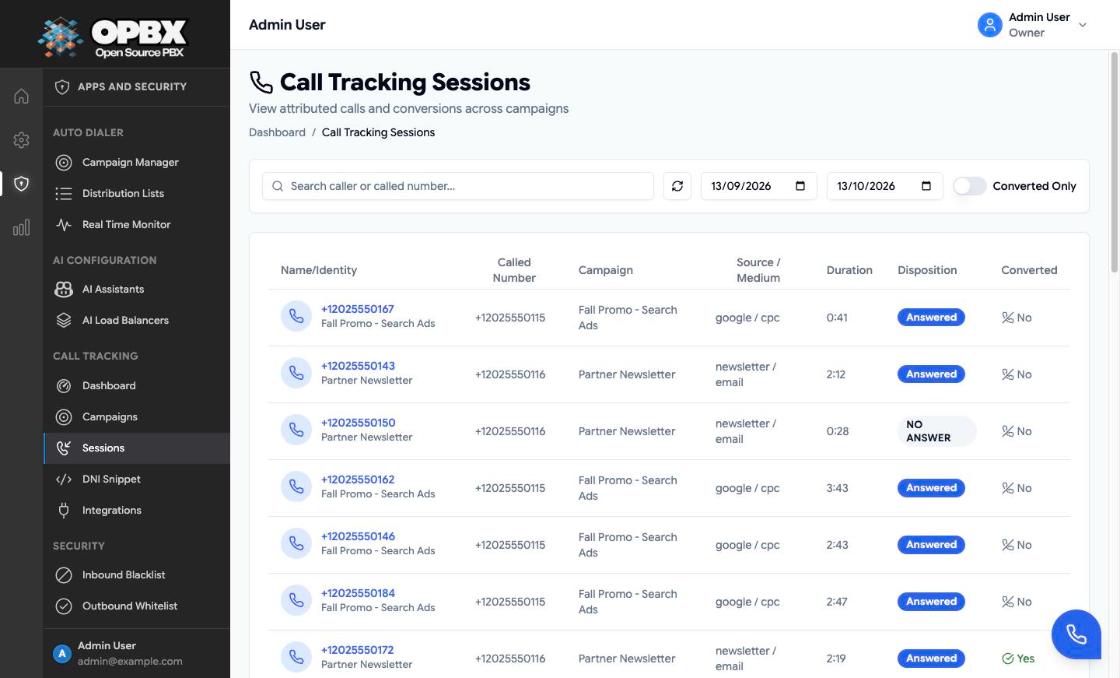
You can filter the list by:
- Caller or called number search
- Start and end date
- Converted calls only
A session is marked as converted when the call meets its campaign's conversion rule. See Conversion Rules.
Permissions
| Action | Owner | PBX Admin | PBX User | Reporter |
|---|---|---|---|---|
| View sessions | Yes | Yes | Yes | Yes |