API Keys
An API key lets a script, an integration or an MCP client call the OPBX REST API without a user session. Each key carries its own list of permissions, one per resource, and those permissions are the only thing that decides what the key may do. The role of the Owner who created the key does not apply.
Purpose
Use this module to:
- give an integration (a CRM, a reporting tool, a provisioning script) access to the API;
- grant read-only or read-write access per resource;
- connect an MCP client to the MCP Server;
- revoke access at once without touching any user account.
Prerequisites
- You are the Owner. No other role can see or manage API keys.
Permissions
| Action | Owner | PBX Admin | PBX User | Reporter | Supervisor |
|---|---|---|---|---|---|
| See API Keys in the sidebar (Analytics section) | Yes | No | No | No | No |
| List, create, update and revoke keys | Yes | No | No | No | No |
Other roles who open the page get the toast Access denied ("You do not have permission to access this page.") and 403 from the API. An API key can never manage API keys, whatever its permissions: the API key endpoints are not grantable and answer 403.
How a key's access works
Each permission pairs a resource with a level:
| Level | Allows |
|---|---|
| Read | GET and HEAD requests to that resource |
| Write | Every method (Write includes Read) |
| No Access | The resource is not granted (no permission row) |
A request authenticated with a key is checked like this:
- The endpoint must belong to a grantable resource. Endpoints outside the list (API key management, user password changes, extension password resets, embed tokens, organization settings, platform management and so on) answer
403"This API key is not permitted to access this endpoint." - The key must have a permission for that resource, otherwise
403"This API key is not permitted to access resource." - A Read permission used with
POST,PUT,PATCHorDELETEanswers403"This API key has read-only access to resource."
A key always acts inside the organization it was created in.
Live calls (session-updates) are split on purpose: a key with Write can disconnect a call, but POST /v1/session-updates/{sessionId}/coach-target (spy, whisper, barge) always answers API keys with 403. Coaching is dialed from a signed-in Owner's or Supervisor's own Web Phone extension, which a key does not have. See Live Calls.
Grantable resources
users, extensions, conference-rooms, ai-assistants, ai-assistant-providers, ring-groups, call-queues, queue-calls, ai-assistant-load-balancers, ivr-menus, business-hours, phone-numbers, outbound-whitelist, inbound-blacklist, call-detail-records, recordings, supervisors, auto-dialer-campaigns, distribution-lists, session-updates, call-notifications, dashboard, trunks
The live list comes from GET /v1/api-keys/grantable-resources. In the dialog the slugs are shown in title case, for example Call Detail Records.
Archived call records
Only an API key can read the archive tier of call detail records (records 6 to 12 months old). Add archive=1 to the list, single-record, export or statistics request of call-detail-records. The flag is ignored for signed-in users, including the Owner. See Call Logs.
Workflows
Create a key
Who can do this: Owner.
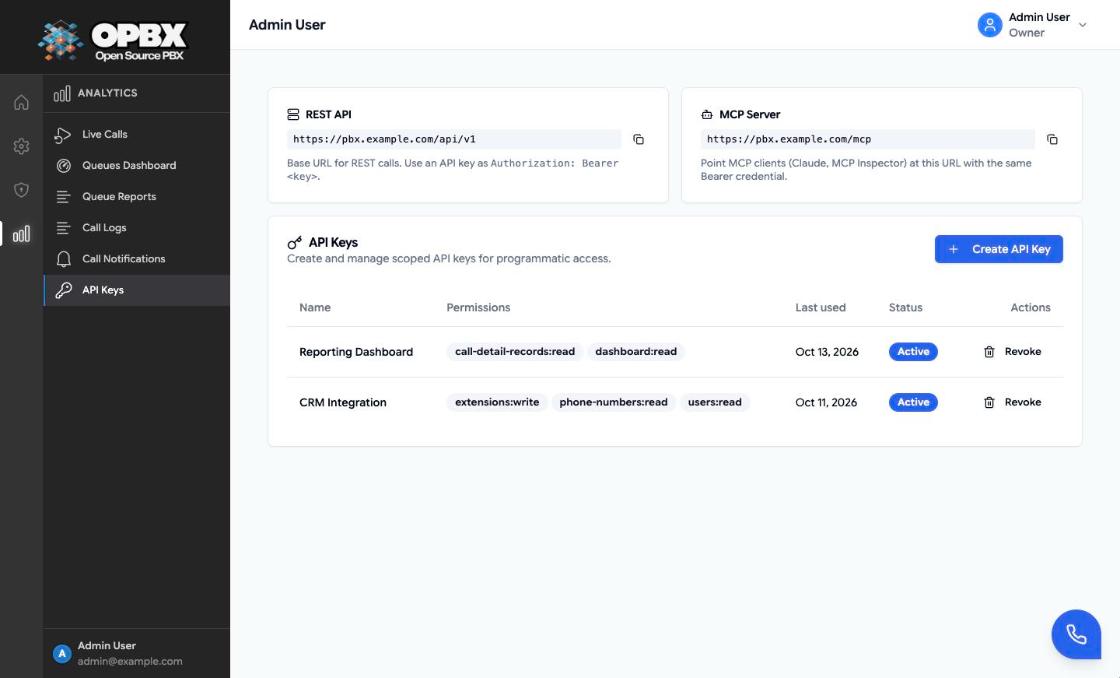
- Open Analytics → API Keys in the sidebar.
- Click Create API Key (top right of the API Keys card, or in the middle of the page when there are no keys yet).
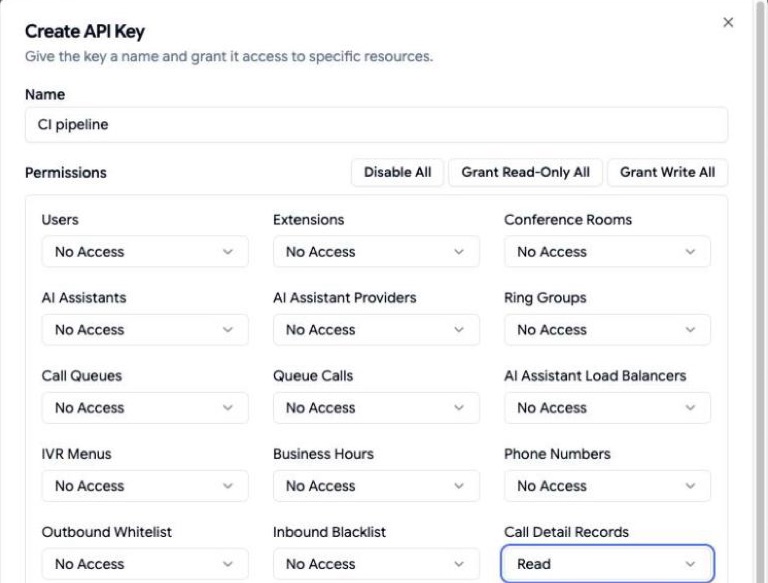
- Enter a Name (required, up to 255 characters), for example
CRM Integration. - Under Permissions, choose No Access, Read or Write for each resource. The buttons Disable All, Grant Read-Only All and Grant Write All set every resource at once.
- Click Create. The button stays disabled until there is a name and at least one permission.
- The toast API key created appears and the API Key Created dialog shows the key once. Click the copy button next to the key (toast Copied) and store it in a secret manager.
- Click I've copied it. The dialog cannot be closed by clicking outside it or pressing Escape.
The new key is listed as Active, with Never under Last used. The key starts with opbxk_ followed by 40 random characters. Only a SHA-256 hash is stored, so the key can never be shown again. If it is lost, revoke it and create a new one.
Use a key
Who can do this: anyone holding the key; the endpoint cards are on the Owner's API Keys page.
- On the API Keys page, click the copy button on the REST API card (toast REST API URL copied to clipboard) or the MCP Server card (toast MCP Server URL copied to clipboard).
- Send the key as a bearer token to that base URL:
curl -H "Authorization: Bearer opbxk_XXXXXXXXXXXXXXXXXXXXXXXXXXXXXXXXXXXXXXXX" \
     https://pbx.example.com/api/v1/phone-numbers
- REST API: the base URL for REST calls.
- MCP Server: the URL to give MCP clients, with the same bearer key. See MCP Server.
Change a key
Who can do this: Owner, through the API with a signed-in session (an API key cannot manage keys).
The page has no edit dialog. To rename a key or replace its permissions, use PUT /v1/api-keys/{id} with name and/or permissions. The new permission list replaces the old one completely and must contain at least one entry. Name and permissions change together or not at all.
Revoke a key
Who can do this: Owner.
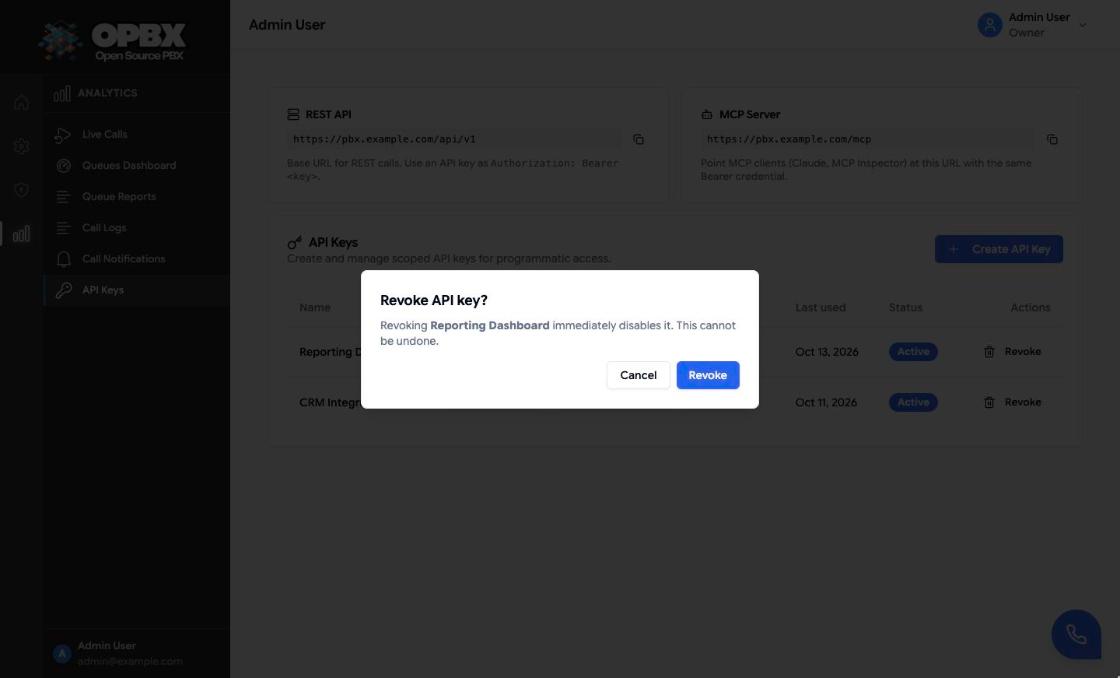
- Click Revoke on the key's row.
- The Revoke API key? dialog says that revoking the key immediately disables it and cannot be undone. Click Revoke.
The toast API key revoked appears. The key stops working immediately: requests with it answer 401 "Unauthenticated." Revoked keys stay in the list, dimmed, with the Revoked badge and no Revoke button. Revoking cannot be undone and a revoked key cannot be deleted.
List columns
| Column | Shows |
|---|---|
| Name | The key's name |
| Permissions | One badge per permission, for example extensions:write |
| Last used | Date of the last request, or Never. Updated at most every 5 seconds per key (every request for users and extensions) |
| Status | Active or Revoked |
| Actions | Revoke for active keys |
Common errors
| Response | What it means | What to do |
|---|---|---|
401 Unauthenticated. | The key is wrong or revoked | Check the key; create a new one if it was revoked |
403 This API key is not permitted to access this endpoint. | The endpoint is not grantable to keys | Use a user session for that action |
403 This API key is not permitted to access resource. | The key has no permission for that resource | Grant the resource with PUT /v1/api-keys/{id} |
403 This API key has read-only access to resource. | A write request with a Read permission | Grant Write |
422 on create | No name, no permissions, an unknown resource or a level other than read or write | Fix the request |
Key data fields
api_keys
| Column | Notes |
|---|---|
id | Primary key |
organization_id | Tenant scope |
name | Up to 255 characters |
token | SHA-256 hash of the key; the key itself is never stored |
created_by | The Owner who created it |
last_used_at | Time of the last request (throttled, see above) |
revoked_at | Set when revoked |
api_key_permissions
| Column | Notes |
|---|---|
api_key_id | The key |
resource | A grantable resource slug |
level | read or write |
Related API endpoints
| Method | Endpoint | Purpose |
|---|---|---|
| GET | /v1/api-keys | List keys, newest first |
| POST | /v1/api-keys | Create a key. The response carries the key once in key |
| GET | /v1/api-keys/grantable-resources | Grantable resource slugs |
| GET | /v1/api-keys/{id} | One key |
| PUT | /v1/api-keys/{id} | Rename and/or replace permissions |
| DELETE | /v1/api-keys/{id} | Revoke |
See the OPBX REST API reference for full schemas.
Related modules
- MCP Server — uses API keys for authentication
- Users — roles for signed-in users
- Call Logs — the archive tier readable with a key