Call Notifications
Call Notifications send an HTTP POST to a URL you choose each time a call in your organization changes status (new, ringing, answered and so on). Use them to update a CRM, show a screen pop or feed your own analytics. Each organization has one notification configuration.
Purpose
Use this module to:
- send call status changes to an external system;
- choose which statuses are sent;
- protect the endpoint with a bearer token or basic authentication;
- control retries, timeout and a per-minute rate limit;
- see every delivery attempt with its request and response.
Prerequisites
- An HTTP or HTTPS endpoint reachable from the internet. Internal network addresses are refused (see URL rules).
- You are the Owner or a PBX Admin.
Permissions
| Action | Owner | PBX Admin | PBX User | Reporter |
|---|---|---|---|---|
| See Call Notifications in the sidebar (Analytics section) | Yes | Yes | No | No |
| View settings, delivery logs and rate-limit status | Yes | Yes | No | No |
| Create or change settings, send a test | Yes | Yes | No | No |
Other roles get 403 from the API, so the page shows an error state if they open its address directly.
Workflows
Set up notifications
Who can do this: Owner, PBX Admin.
- Open Call Notifications in the sidebar (under Analytics). The page opens on the Delivery Logs tab.
- Open the Settings tab.
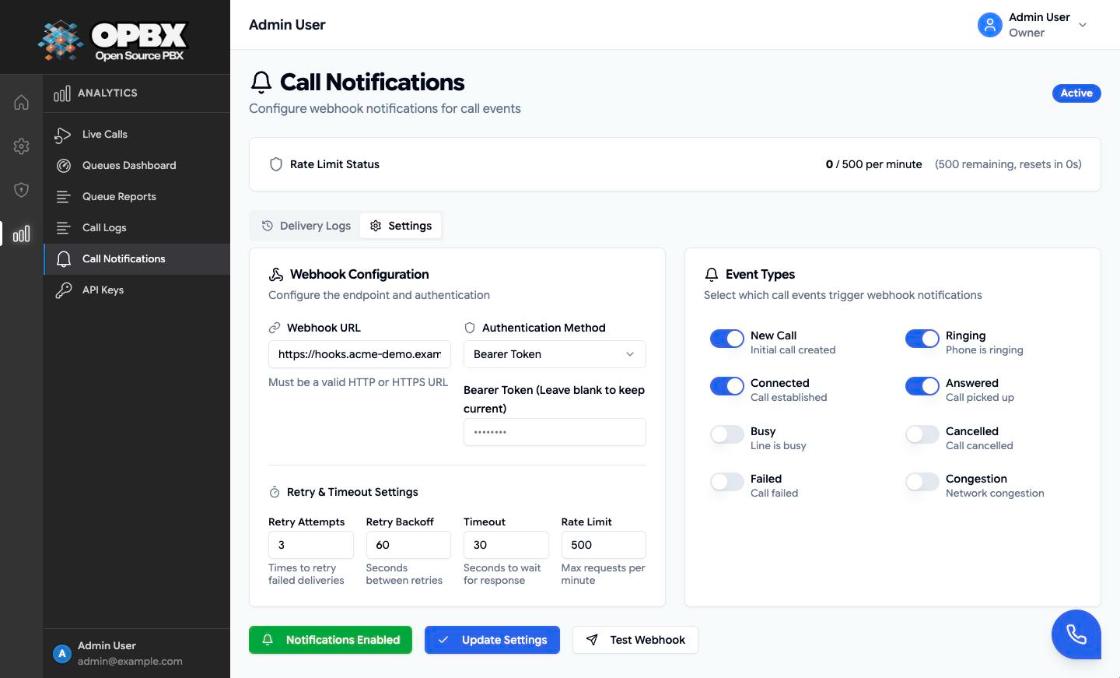
- Under Webhook Configuration, enter the Webhook URL. An
http://address shows the warning "HTTP is insecure. Use HTTPS in production environments." - Choose the Authentication Method. For Bearer Token enter the token; for Basic Authentication enter the Username and Password.
- Under Retry & Timeout Settings, set Retry Attempts, Retry Backoff, Timeout and Rate Limit, or keep the defaults.
- Under Event Types, switch on the statuses you want. All eight are on to begin with.
- Click Create Settings. The button stays disabled while the Webhook URL is empty.
The toast "Notification settings created successfully" appears. The Active badge shows next to the page title, and the Notifications Enabled, Update Settings and Test Webhook buttons appear.
Change the settings
Who can do this: Owner, PBX Admin.
- Open the Settings tab.
- Change the fields. The secret field reads Bearer Token (Leave blank to keep current) or Password (Leave blank to keep current): leave it empty to keep the saved secret.
- Click Update Settings.
The toast "Notification settings updated successfully" appears.
Turn notifications on or off
Who can do this: Owner, PBX Admin.
- Open the Settings tab of a saved configuration.
- Click Notifications Enabled to stop sending, or Notifications Disabled to start again.
The change is saved at once (with the other values currently in the form) and the toast "Notification settings updated successfully" appears. The badge next to the page title shows Active or Inactive. While inactive, nothing is sent and nothing is logged.
There is no delete button on the page. To remove the configuration, use DELETE /v1/call-notifications/settings.
Test the webhook
Who can do this: Owner, PBX Admin.
- Open the Settings tab of a saved configuration.
- Click Test Webhook.
OPBX posts a sample event with "test": true, a new status, the caller name Test Caller and the fictional numbers +12125551234 and +12125555678. When your endpoint answers 2xx, the toast "Test webhook sent successfully" appears; otherwise the toast shows the error, for example "Test webhook delivery failed". The attempt is listed in the delivery logs. The test is refused with "Notification settings not configured" while notifications are disabled.
View delivery logs
Who can do this: Owner, PBX Admin.
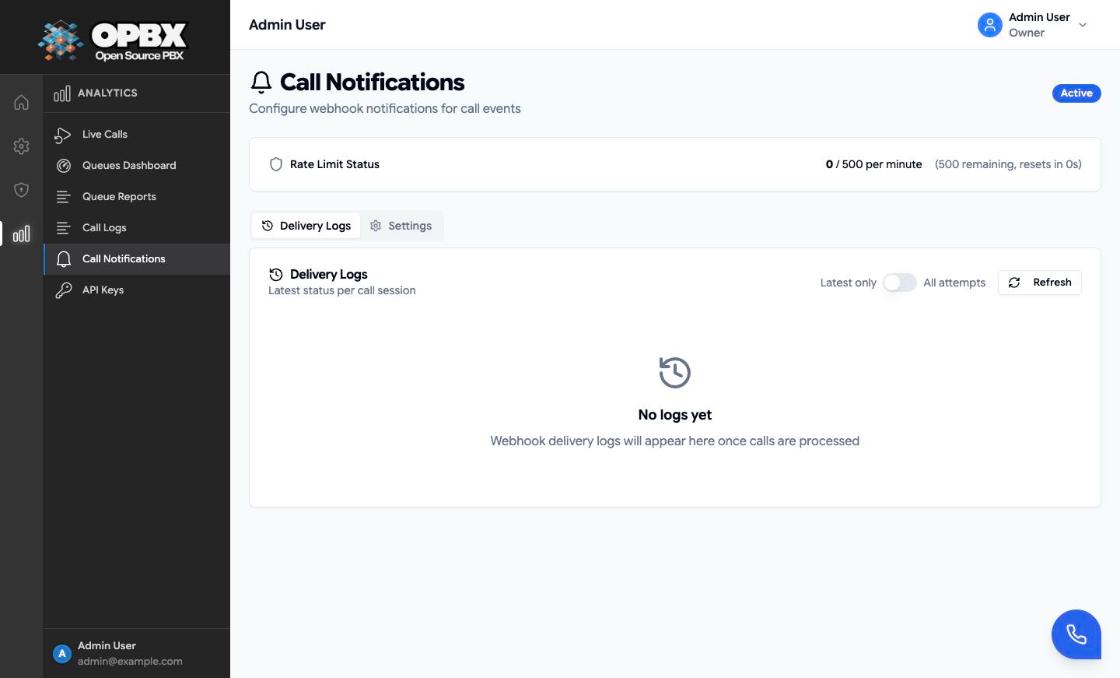
- Open Call Notifications. The Delivery Logs tab lists deliveries with Time, Session Token, From, To, Status (green for success, red for failure) and Response (HTTP code and response time).
- Leave the switch on Latest only to see the latest delivery per call, or switch to All attempts to see every delivery.
- Click Refresh to reload the list.
The Authorization header is never stored: the logs show it as [redacted]. Logs are kept for 90 days by default (server setting RETENTION_CALL_NOTIFICATION_LOGS_DAYS).
Inspect a delivery
Who can do this: Owner, PBX Admin.
- On the Delivery Logs tab, click a session token or the debug (bug) icon on its row.
- The Call Notification Debug dialog opens. The Notifications list on the left has every notification for that call; click one to select it.
- Read the Request (URL, method, headers, body) and the Response (status, time, headers, body). "No response received" means the request timed out or could not connect.
Payload
{
  "event_type": "call.status_update",
  "event_id": "…",
  "timestamp": "2026-10-13T09:15:02+00:00",
  "organization_id": 12,
  "session": {
    "call_session_token": "…",
    "from": "+12025550131",
    "to": "+12025550100",
    "direction": "inbound",
    "call_start_time": "…",
    "call_answer_time": null,
    "call_end_time": null,
    "call_duration": 0,
    "call_billable_duration": 0,
    "status": "ringing",
    "previous_status": "new"
  },
  "metadata": { "caller_name": null, "extension_id": 5, "did_id": 1 }
}
Your endpoint should answer with a 2xx status. A 5xx, a 429, a timeout or a connection error is retried; any other 4xx is not.
Rate limit
The Rate Limit Status bar at the top shows events sent in the current minute, the limit, the remaining count and when the window resets. Events above the limit are dropped (not queued and not retried).
Settings
| Field | Required | Limits and default | Meaning |
|---|---|---|---|
| Webhook URL | Yes | Valid URL, up to 2048 characters, http or https, public host | Where events are posted |
| Authentication Method | Yes | No Authentication, Bearer Token or Basic Authentication. Default: No Authentication | Which Authorization header is sent |
| Username | For Basic Authentication | Up to 255 characters | Basic-auth user name |
| Bearer Token / Password | Bearer Token: yes. Basic: no | 16 to 512 characters | The secret. Once saved it is never shown again; leave the field blank to keep it |
| Retry Attempts | No | 1 to 10. Default: 3 | Retries after a failed delivery |
| Retry Backoff | No | 10 to 3600 seconds. Default: 60 | Delay before the first retry; it doubles for each further retry (capped at 1 hour) |
| Timeout | No | 5 to 120 seconds. Default: 30 | How long to wait for your endpoint |
| Rate Limit | No | 100 to 5000 per minute. Default: 500 | Maximum events sent per minute |
| Event Types | Yes | At least one | Which statuses are sent (table below) |
Failed deliveries are retried up to the number of Retry Attempts. The first retry waits Retry Backoff seconds and each further retry waits twice as long as the one before (with the default 60 seconds: 60, 120, 240...), never more than one hour.
Authentication header
| Method | Header sent |
|---|---|
| No Authentication | None |
| Bearer Token | Authorization: Bearer <token> |
| Basic Authentication | Authorization: Basic <base64 of username:password> |
Every request also carries Content-Type: application/json and User-Agent: Cloudonix-PBX-Webhook/1.0.
Event types
A call's status from Cloudonix is mapped to one of eight events. Only enabled events are sent.
| Event (label) | Sent when the call status is |
|---|---|
New Call (new) | new, initiated, created |
Ringing (ringing) | ringing, ring, progress |
Connected (connected) | connected, connect |
Answered (answered) | answer, answered, active |
Busy (busy) | busy |
Cancelled (cancel) | cancel, cancelled, canceled |
Failed (failed) | failed, fail, error |
Congestion (congestion) | congestion, congested |
All eight are on by default.
URL rules
The URL is checked when you save and again before every delivery. It is refused with "…must be a valid, publicly accessible URL. Internal network addresses are not allowed." when:
- the scheme is not
httporhttps; - the host is
localhostor a name of an OPBX service (for examplemysql,redis,app,nginx); - the host resolves to a private, loopback or link-local address.
Common errors
| Message | What it means | What to do |
|---|---|---|
| The webhook URL must be a valid URL. | The URL is malformed | Enter a full URL with https:// |
| …must be a valid, publicly accessible URL. Internal network addresses are not allowed. | The URL points at a private or internal host | Use a public endpoint |
| Authentication secret is required for this auth method. | Bearer Token without a token | Enter the token |
| Authentication secret must be at least 16 characters. | The token or password is too short | Use 16 characters or more |
| Username is required for basic authentication. | Basic Authentication without a user name | Enter the user name |
| At least one event type must be enabled. | Every event switch is off | Switch on at least one |
| Test webhook delivery failed | Your endpoint did not answer 2xx | Open the delivery log to see the response |
Key data fields
call_notifications_settings
| Column | Notes |
|---|---|
organization_id | One configuration per organization |
webhook_url | Target URL |
auth_method | none, bearer_token or basic_auth |
auth_username, auth_secret | Credentials; the secret is never returned (only has_auth_secret) |
retry_attempts, retry_backoff_seconds, request_timeout_seconds, rate_limit_per_minute | See Settings |
enabled_events | List of enabled events |
is_active | On or off |
call_notification_logs
One row per event; retries update the same row. It holds the session token, event id, status, request payload, request headers (Authorization redacted), response code and body, response time, attempt number and success flag.
Related API endpoints
| Method | Endpoint | Purpose |
|---|---|---|
| GET | /v1/call-notifications/settings | Current settings (data: null when none) |
| POST | /v1/call-notifications/settings | Create (409 if they exist) |
| PUT | /v1/call-notifications/settings | Update |
| DELETE | /v1/call-notifications/settings | Delete the configuration |
| POST | /v1/call-notifications/settings/test | Send a test event |
| GET | /v1/call-notifications/logs | Latest delivery per session; show_all=1 for every attempt, with session_token, status, success, from, to filters |
| GET | /v1/call-notifications/logs/{sessionToken} | All deliveries for one call |
| GET | /v1/call-notifications/rate-limit | Current rate-limit window |
API keys need the call-notifications resource. See the OPBX REST API reference for full schemas.
Related modules
- Live Calls — the same status changes, shown in the app
- Call Logs — completed call records
- API Keys — read the logs from a script