MCP Server
OPBX ships an optional MCP (Model Context Protocol) server, opbx-mcp. It gives AI agents (Claude, IDE assistants, your own LLM tools) a safe way to inspect and change your phone system: extensions, phone numbers, ring groups, call queues, IVR menus, business hours, conference rooms, AI assistants, auto-dialer campaigns, call records, live calls and more.
What it is, and what it is not
- It is a layer of intent-level tools over the OPBX REST API, for example
configure_phone_number_routing,start_campaignorvalidate_configuration. - It is not a generic REST proxy. It never reads the database. Every action goes through the REST API with the caller's own credential and permissions.
- It never exposes the call-handling side of OPBX (voice webhooks, dialer internals), SIP passwords, web phone or embed credentials, Cloudonix settings or API-key management.
Prerequisites
- The
mcp-serverservice is running (it is part of the Docker Compose stack). - An OPBX credential for the agent: an API key (recommended) or a user's personal access token.
Where to find the URL
The MCP Server card at the top of the API Keys page (Owner) shows the URL to give to MCP clients, next to the REST API card. It is the organization's Webhook Base URL from Settings followed by /mcp, or, when that is empty, the address you opened OPBX on followed by /mcp, for example https://pbx.example.com/mcp. nginx forwards /mcp to the MCP container, so no extra port is needed.
For local development only, the container's port can be published on the loopback interface by starting the stack with -f docker-compose.ports.yml (http://127.0.0.1:8080/mcp, port from MCP_PORT).
| Path | Purpose |
|---|---|
/mcp | MCP endpoint (Streamable HTTP) |
/health | Liveness (container-internal or on the dev port) |
/ready | Readiness, including a check that OPBX answers |
Workflows
Copy the MCP server URL
Who can do this: Owner (the API Keys page is Owner-only).
- In the sidebar, click API Keys.
- On the MCP Server card, click the copy button next to the URL.
A toast confirms "MCP Server URL copied to clipboard".
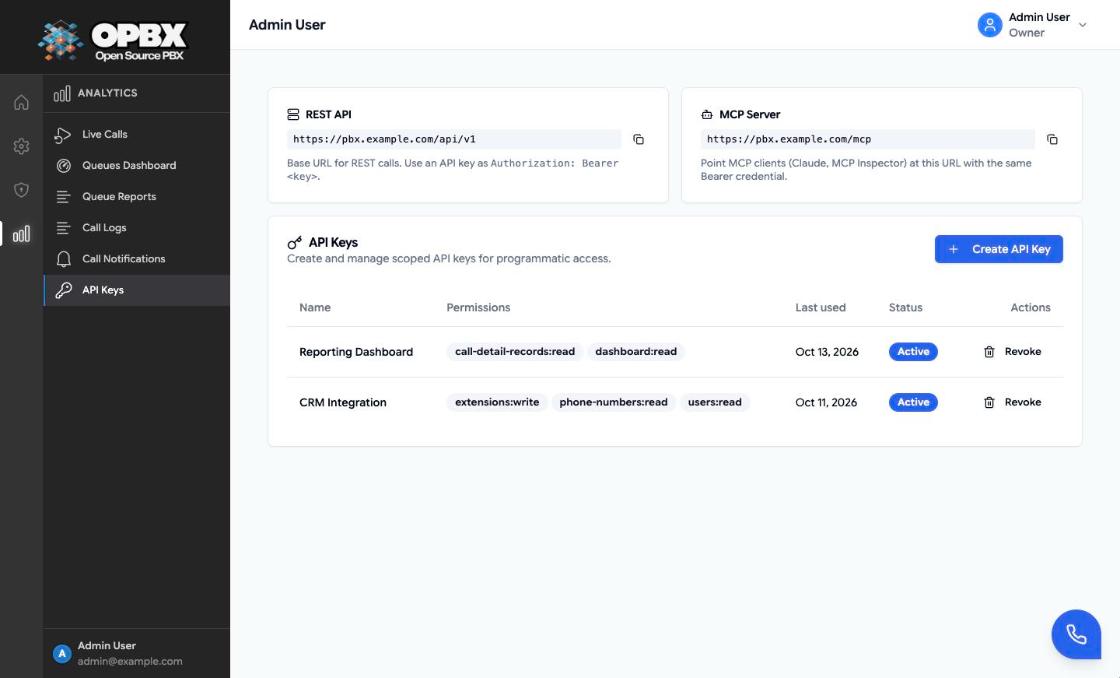
Connect an MCP client
Who can do this: Owner, to create the API key. Anyone can then use the key in an MCP client.
- On the API Keys page, create a key with the resource grants the agent needs, and copy the
opbxk_…value (it is shown once). - Copy the MCP server URL.
- In your MCP client (for example Claude or MCP Inspector), add a server with that URL and the header
Authorization: Bearer <key>. See the example configuration below. - Ask the agent to run
validate_configurationto check the connection.
The agent lists the OPBX tools and answers with the configuration report. A wrong or revoked key makes every tool call fail with an authentication error.
Credentials
The client sends its own OPBX credential as a bearer token. The MCP server stores nothing.
| Credential | Format | Best for | Notes |
|---|---|---|---|
| API key | opbxk_… | Long-running agents | Never expires; can be revoked. Access is exactly the key's resource grants |
| Personal access token | id|token | Interactive use | Acts with the user's role. Expires after 24 hours (30 days when the login sent "remember": true) and stops working when the user signs in again or changes the password |
Example client configuration:
{
  "mcpServers": {
    "opbx": {
      "url": "https://pbx.example.com/mcp",
      "headers": { "Authorization": "Bearer opbxk_XXXXXXXXXXXXXXXXXXXXXXXXXXXXXXXXXXXXXXXX" }
    }
  }
}
The organization always comes from the credential. Tools do not accept an organization id, and the platform-manager "operate as" header is never sent. A request without an Authorization: Bearer header, or with a personal access token OPBX rejects, is refused with 401 before any tool runs. An opbxk_ API key is not checked up front: OPBX checks it on each tool call, and a wrong or revoked key fails there with an authentication error.
Permissions
The MCP server checks the caller's role on every tool call, using the same rules as OPBX, and is stricter where OPBX is permissive.
| Caller | What the agent can do |
|---|---|
| Owner | Everything the tools offer |
| PBX Admin | Configuration tools. Owner-only actions stay Owner-only (for example deleting or archiving a campaign, disconnecting a call) |
| PBX User | Read tools only, except the user and supervisor tools |
| Reporter | Read tools only (configuration, call records, analytics), except the user and supervisor tools |
| Supervisor | Read tools, scoped views and start_call_coaching, limited to the people and groups assigned to them |
| API key | Whatever the key's grants allow, enforced by OPBX |
Confirmation for risky actions
Deletes, campaign start, pause, resume and archive, disconnect_call, start_call_coaching, assigning a distribution list and removing security rules need two calls:
- Called without
confirm, the tool returnsconfirmation_required: trueand a live preview of the target with warnings (for example "deleting the extension also removes its Cloudonix subscriber"). - Called again with
confirm: true(the boolean, not a string), the action runs.
A delete that OPBX refuses because the item is still in use comes back as a conflict error with OPBX's message, which names where the item is used. Change those references first, as you would in the app.
Rate limits
Per caller, per minute (defaults, configurable by the administrator with RATE_LIMIT_READ_PER_MIN, RATE_LIMIT_WRITE_PER_MIN, RATE_LIMIT_SENSITIVE_PER_MIN and RATE_LIMIT_IP_PER_MIN):
| Class | Limit |
|---|---|
| Read tools | 120 |
| Write tools | 30 |
Sensitive tools (campaign control, live calls, bulk operations such as validate_configuration) | 10 |
| Per IP address | 600 |
OPBX's own per-organization API limits also apply.
Tools, resources and prompts
More than a hundred tools, grouped by area:
| Area | Examples |
|---|---|
| Extensions and users | list_extensions, create_extension, update_user, invite_user |
| Phone numbers | list_phone_numbers, configure_phone_number_routing, list_available_caller_ids |
| Routing | create_ring_group, create_ivr_menu, list_ivr_voices, create_business_hours, set_business_hours_status |
| Call queues (read-only) | list_call_queues, get_call_queue, get_call_queue_stats, get_call_queue_live, list_queue_calls |
| Conference rooms and AI | create_conference_room, list_ai_assistants, list_ai_load_balancers, list_ai_providers |
| Auto dialer | create_campaign, start_campaign, list_campaign_destinations, create_distribution_list, get_campaigns_monitor_summary |
| Calls | search_calls, get_call_details, get_call_statistics, list_active_calls, disconnect_call |
| Security lists | list_inbound_blacklist, block_inbound_number, list_blocked_calls, add_outbound_whitelist_rule |
| Trunks | list_trunks, create_trunk, update_trunk |
| Supervisors | get_supervisor_assignments, get_supervisor_dashboard, start_call_coaching |
| Audit | validate_configuration |
validate_configuration checks the whole configuration for broken references (phone numbers routed to inactive targets, ring groups without members, campaigns without ready lists and so on) and suggests fixes. It is a good first tool to try.
The server also offers read-only resources (opbx://organization, opbx://extensions/{id} and similar) and four prompts: configure_pbx, build_inbound_call_flow, create_outbound_campaign and diagnose_call_problem.
Audit
Every tool call is logged with a request id, trace id, tool name, permission, organization and user. Destructive tools are logged at an elevated level. OPBX also audit-logs sensitive changes on its side.
Troubleshooting
| Symptom | Cause | What to do |
|---|---|---|
401 on every call | Missing header, or a wrong or expired personal access token | Check the bearer token |
| Every tool fails with an authentication error | Wrong or revoked API key | Create a new API key |
502 "OPBX API is unreachable; credential could not be validated" (JSON-RPC error from the MCP server) | The MCP server cannot reach OPBX | Check that the OPBX stack is up |
429 | Too many requests from one address | Wait a minute |
A tool answers rate_limited ("Rate limit for … operations exceeded") | The caller passed the per-minute limit for that class of tools | Wait a minute |
| A tool answers "forbidden" | The role or API key does not allow it | Use a credential with the right role or grant |
| A delete answers with a conflict | The item is still used elsewhere | Change the listed references, then delete |
/mcp returns 502 | The mcp-server container is not running | docker compose up -d mcp-server |
More documentation
The full reference is in the repository under mcp-server/docs/: the tool catalog (mcp-tools.md), resources, prompts, authentication, security model and deployment.