Domain Management
With Cloudonix, managing multiple service domains (or accounts) is easy and simple. Unlike other platforms, Cloudonix uses a domain naming convention, similar to the way Internet domains naming (FQDN) works. In fact, for ease of use, we recommend using Internet valid FQDNs as your domains.
What is a Cloudonix domain?
In Cloudonix, a domain represents a walled-garden environment, where various resources interact. These resources
can be users (admin users), subscribers (remote devices), applications (voice applications) and more. For simplicity,
in Cloudonix we refer to all of these as Models or Objects. Each with its own set of properties and functionality.
Why multiple domains?
Unlike other CPaaS platforms, Cloudonix is designed to enable developers to build multi-tenant services, while keeping the highest level of security and seperation possible. As previously indicated, a domain is a walled-garden, which means, resources (Models/Objects) from one domain, can't interact or affect another domain. These unique approach enables developers to build sub-accounts or sub-brands, under their existing account - while providing other people access to a specific domain.
Cloudonix domain properties
A Cloudonix domain includes various properties, which affect how the domain functions. Some of the properties require additional information, such as Registration Free Dialing properties, while others are relatively self-explanatory.
| Property | Description | Type | Default |
|---|---|---|---|
| CNAME Aliases | A CNAME Alias specifies an alias to the current Cloudonix domain name. A CNAME Alias can be used to define your own DNS FQDN that will be used as an alias to the provisioned Cloudonix domain. | String | None |
| Regisration Free Control Endpoint | Registration Free Dialing Guide | String | None |
| Regisration Free Authorization Key | Registration Free Dialing Guide | String | None |
| Domain Request Authorization Key | A unique string that will be added to Voice Application Requests as an authorization header. | String | None |
| Authorization Key Type | How will the authorization key be presented. Options are: RFC 6750 Bearer Token, Custom Header or Query Parameter | String | RFC 6750 Bearer Token |
| No Answer Timeout | When dialing a destination, how long to wait for an answer. | Number | 60 |
| Allow Border-To-Border Calls | Trunk Management Guide | Boolean | False |
| Redirect unknown destination to Border | Trunk Management Guide | Boolean | True |
| Play ringtone to subscribers immediately | Subscribers Management Guide | Boolean | False |
| Domain session update callback URL | A remote URL to submit real-time session update reports. | String | None |
| Least Cost Routing Server Address | A remote URL for Least Cost Routing services (Deprecated) | String | None |
| Pass Caller ID | Pass the inbound Caller-ID Presentation (SIP From Header) to the destination. | Boolean | True |
| Allow subscribers to create sessions | Subscribers Management Guide | Boolean | True |
| API Messaging Notification URL | Messaging Guide | String | None |
| API Messaging Archive Bucket (S3) | [Messaging Guide](/Documentation/apiWorkflow/messaging | String | None |
| CDR Delivery Endpoint | A remote URL to submit call detail records, at the end of each call. | String | None |
| Recording Media Format | When performing a recording (call or message), what format shall be used to generate the file for download. | String | mp3 |
The Domains View
Once you've finished creating your Cloudonix account, and you're logged on to the cockpit, your screen should look like the following:
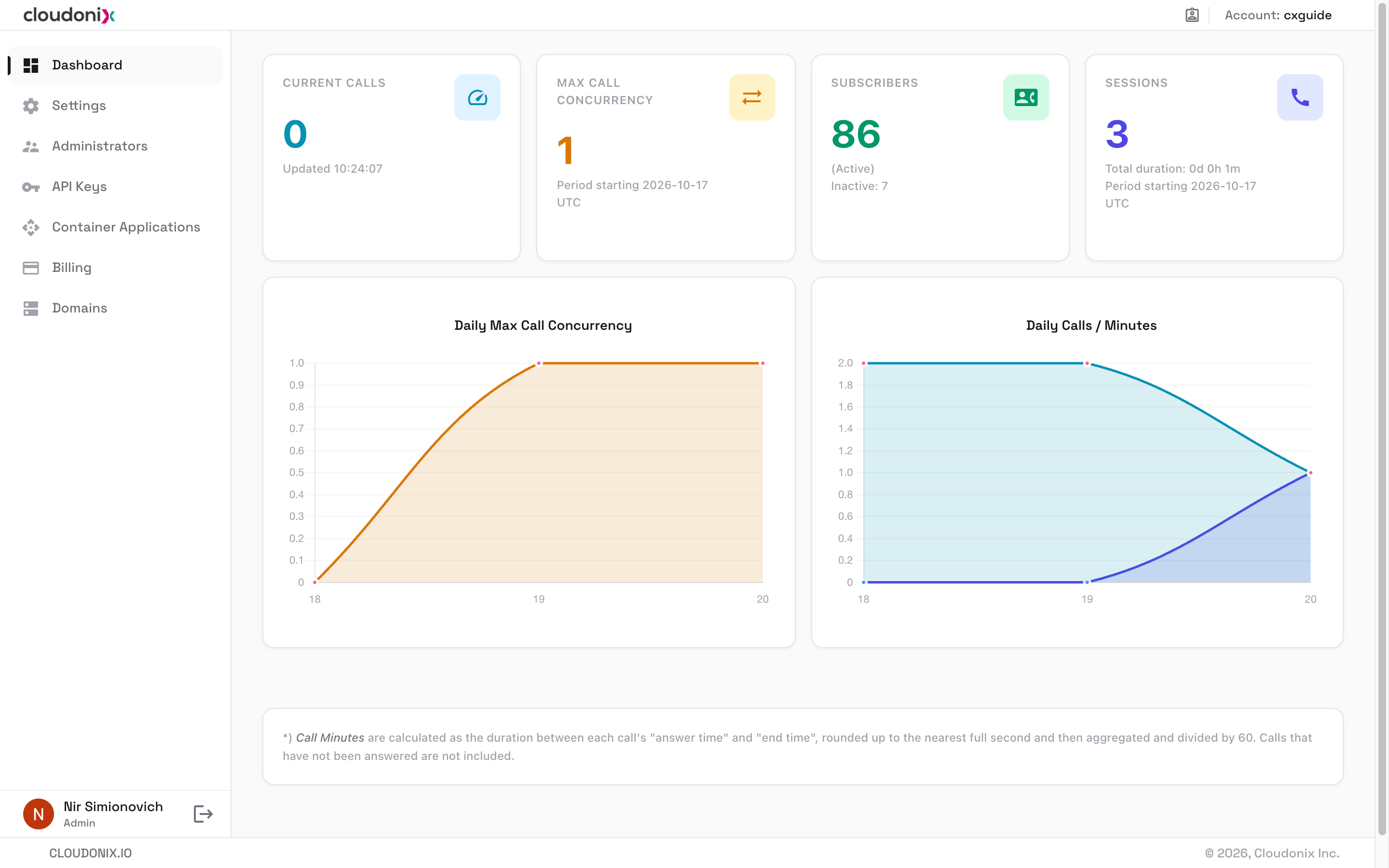
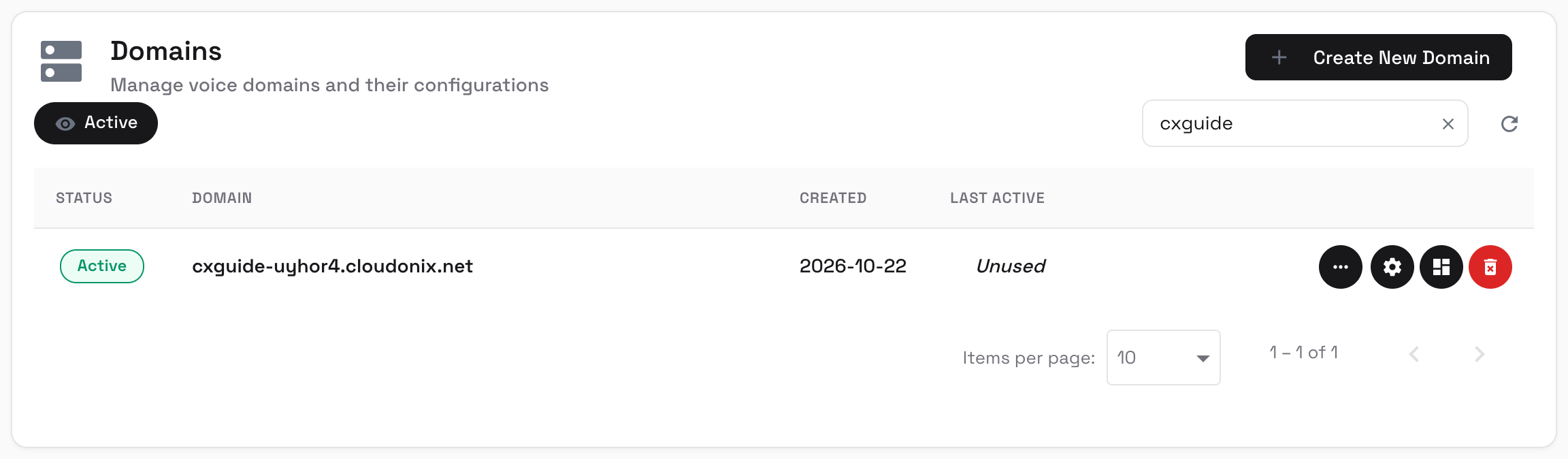
Click the Domains menu option, to access the domains management view. The screen will change, displaying a list of
available domains. Use the Create New Domain button to create a new domain, the Active filter toggle and the search
box to narrow the list. In the example below, the list is filtered by the search term cxguide, showing a single domain
named cxguide-uyhor4.cloudonix.net (new cloudonix.net subdomains receive a random suffix, in the form of
<label>-<6 chars>.cloudonix.net):
Cloudonix domain associated Models/Objects
On the right hand side of each domain row are the domain actions:
| Icon | Title | Description |
|---|---|---|
| More | Additional domain actions. | |
| Edit Domain Settings | Manage the domains properties and settings. | |
| Domain Dashboard | Open the domain and view its statistical dashboard. | |
| Delete | Delete the domain and it's associated resources. |
Once a domain is opened, the left hand menu displays the Cloudonix Domain associated Models/Objects that can be managed. These are:
| Menu Item | Description |
|---|---|
| Dashboard | View the domain statistical dashboard. |
| Settings | Manage the domains properties and settings. |
| Administrators | Manage the domain administrators. |
| API Keys | Manage the domain API keys. |
| Inbound Trunks | Trunk Management Guide |
| Outbound Trunks | Trunk Management Guide |
| Applications | Voice Applications Management Guide |
| Subscribers | Subscribers Management Guide |
| Sessions | A list of ongoing and completed sessions (limited to the last 100 sessions). Additional sessions can be obtained via the Sessions REST API. |
| Return | Return to the tenant (account) menu. |