Voice Trunk Management
A Trunk is a connection between the Cloudonix platform and a remote SIP compliant platform. A Trunk provides
connectivity to the telephony provider (carrier network) or a remotely installed UCaaS, CCaaS or CPaaS provider.
For sake of simplicity, you can imagine a Trunk as the old telephone connector in your house - where you used
to connect a desk phone and get a solid tone, indicating that your phone line is alive - allowing you to make
outbound calls (Outbound Trunk) or receive calls (Inbound Trunk). Just like any other Model/Object in Cloudonix,
an trunks have various properties, depending on their trunk direction (Inbound or Outbound).
Click here for a complete list of compatible carrier networks and vendors, that had already been connected to Cloudonix successfully.
Outbound Trunk
An Outbound Trunk carries voice calls from Cloudonix to a remote carrier or vendor platform.
Properties List
| Property | Description | Type | Default |
|---|---|---|---|
| Trunk Name | A unique name that identifies your outbound trunk | String | None |
| Transport | What transport is used by outbound trunk. Values may be UDP, TCP or TLS. | String | UDP |
| Host | The remote IP address or FQDN of your provider or equipment | String | None |
| Port | The remote IP port of your provider or equipment | Number | 5060 |
| Prefix | A string that is prepended to the dialed destination phone number | String | None |
| Metric | A number representing the priority of this outbound trunk. Higher values prefer this trunk. | Number | None |
| Lock routing to this Cloudonix border server | Force Cloudonix to route outbound calls via a specific border gateway IP or FQDN. | String | None |
| Force domain name for SIP | Use provided string as the SIP Domain for call via this outbound trunk. | String | None |
| Force SIP Request URI to use this destination address | Use provided IP address or FQDN in the SIP Request URI. This does not affect the actual address used to connect to the trunk. | String | None |
| Login User | A username provided by the carrier for SIP authorization. | String | None |
| Password | A password provided by the carrier for SIP authorization. | String | None |
| Overwrite caller ID with login user name | Use the Login User as the caller ID. This is a requirement for some SIP providers. | Boolean | False |
| Register with the SIP gateway | Register with the remote SIP gateway, using the Login User and Password. | Boolean | False |
An outbound trunk may also include various Trunk Profile Settings - however, these currently have no actionable effect on outbound trunk operations.
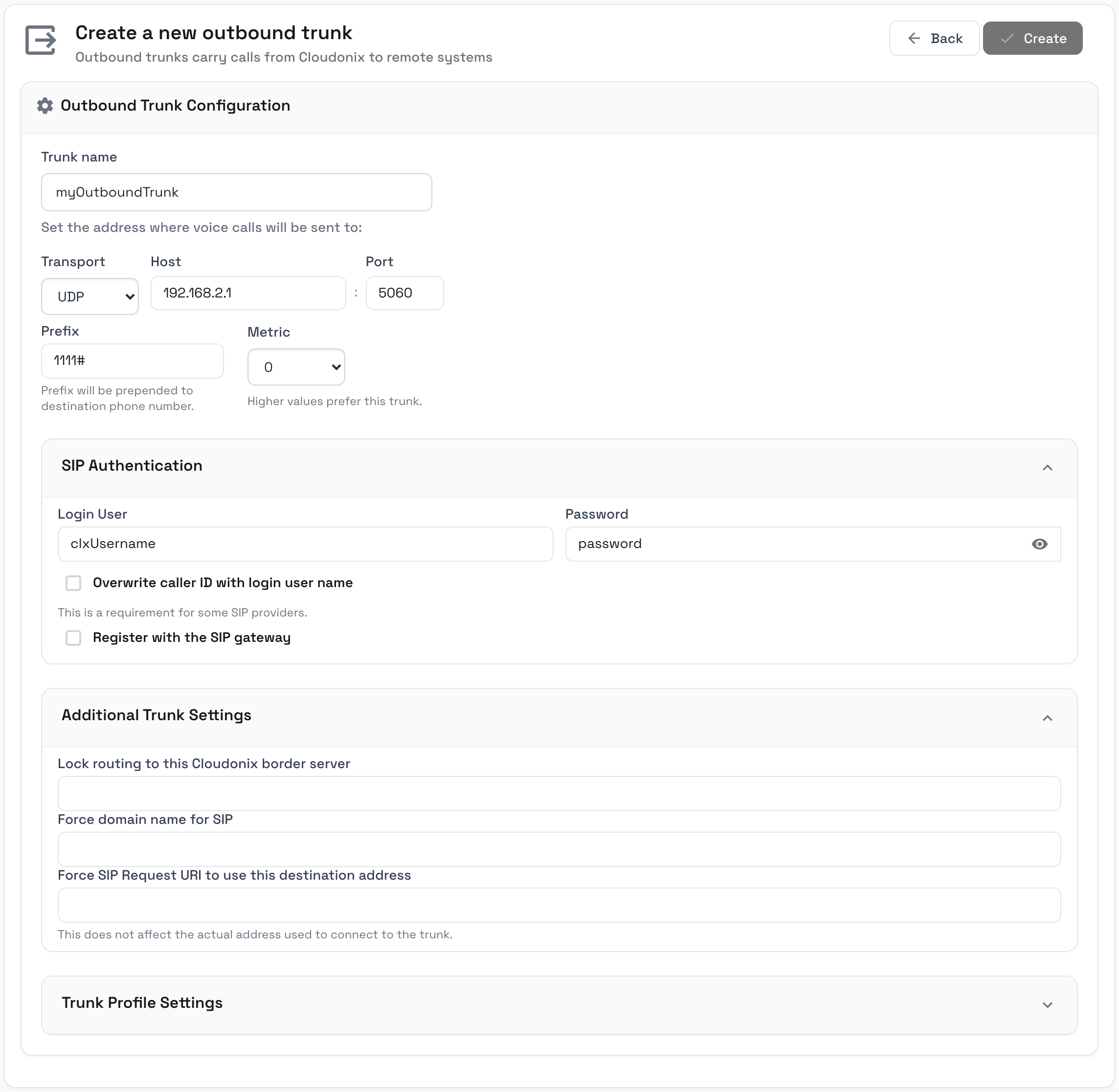
To create an outbound trunk, click the Outbound Trunks menu item of your domain, then click the Add Trunk button. The Create a new outbound trunk page
will appear, with a single Outbound Trunk Configuration section. The Login User and Password properties (and the related options) are set in the collapsible SIP Authentication panel,
while the Lock routing to this Cloudonix border server, Force domain name for SIP and Force SIP Request URI to use this destination address properties are set in the collapsible
Additional Trunk Settings panel. Click the Create button to save the trunk. Following below is a sample of the Outbound Trunk cockpit view:
Inbound Trunk
An Inbound Trunk carries voice calls from a carrier network or a remote vendor platform into Cloudonix.
Properties List
| Property | Description | Type | Default |
|---|---|---|---|
| Trunk Name | A unique name that identifies your inbound trunk | String | None |
| Transport | What transport is used by inbound trunk. Values may be UDP, TCP or TLS. | String | UDP |
| Host | The remote IP address, host name or CIDR range of your provider or equipment, from which voice calls are to be received | String | None |
| Port | The remote IP port of your provider or equipment. Set the port to 0 to match incoming calls from any port. | Number | 5060 |
| Prefix | A string that is matched against the prefix of the destination phone number. This string will automatically be removed by Cloudonix, if the call is accepted for processing. | String | None |
An inbound trunk may also include various Trunk Profile Settings - however, these currently have no actionable effect on inbound trunk operations.
Inbound CNAME aliasing
When a Cloudonix Domain is created, an auto generated domain alias is created, enabling a simpler way to create an inbound voice trunk. The domain CNAME alias can be obtained from the Settings screen of your Cloudonix domain.
Once you have your CNAME, copy it to your favorite editor, then append to it the following text: .sip.cloudonix.net.
The newly created FQDN represents your Cloudonix inbound trunk address. For example, assuming your CNAME alias is 1234567890-abcdefgh,
then your inbound voice trunk address will be 1234567890-abcdefgh.sip.cloudonix.net.
The complete inbound trunk hostname is also displayed in the Configuration For Inbound Calls panel of the Inbound Trunks view
(Your SIP trunk hostname for inbound calls), together with the SIP trunk IP address for inbound calls.
When a remote service provider initiates a SIP call to Cloudonix, sending it to the above domain will automatically assign that inbound call to your Cloudonix domain for further voice application processing.
Inbound Full INVITE Inspection
Full INVITE Inspection is designed as an additional security tool, to ensure that calls from specific endpoint match specific criteria. Matching is performed as either an Exact, Partial or a Regular Expression match.
Matching can be performed based upon a specific SIP Header and its value, set in the collapsible Inbound Full INVITE Inspection panel (Header name, Match type and Value to match).
Let us assume the following inspection criteria:
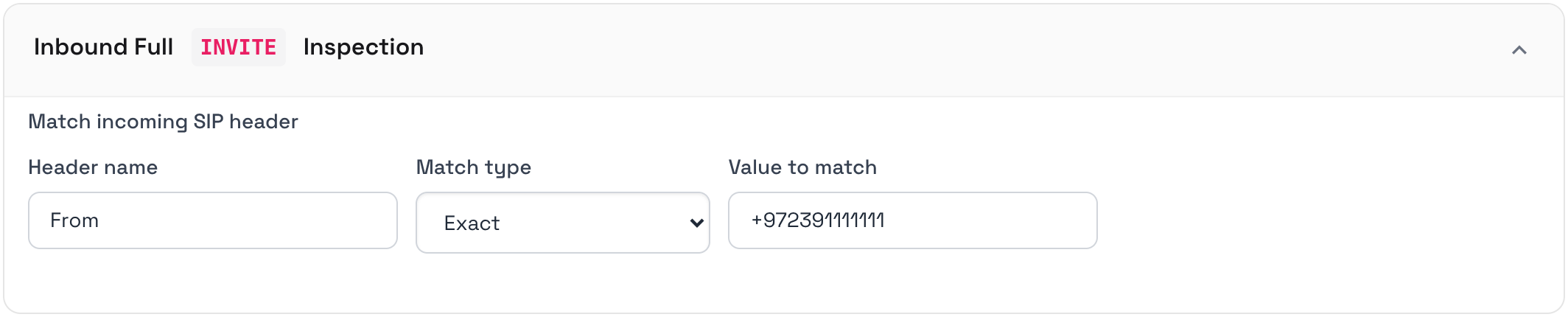
If the inbound call SIP From: Header doesn't match the string +972391111111 the inbound call is then rejected.
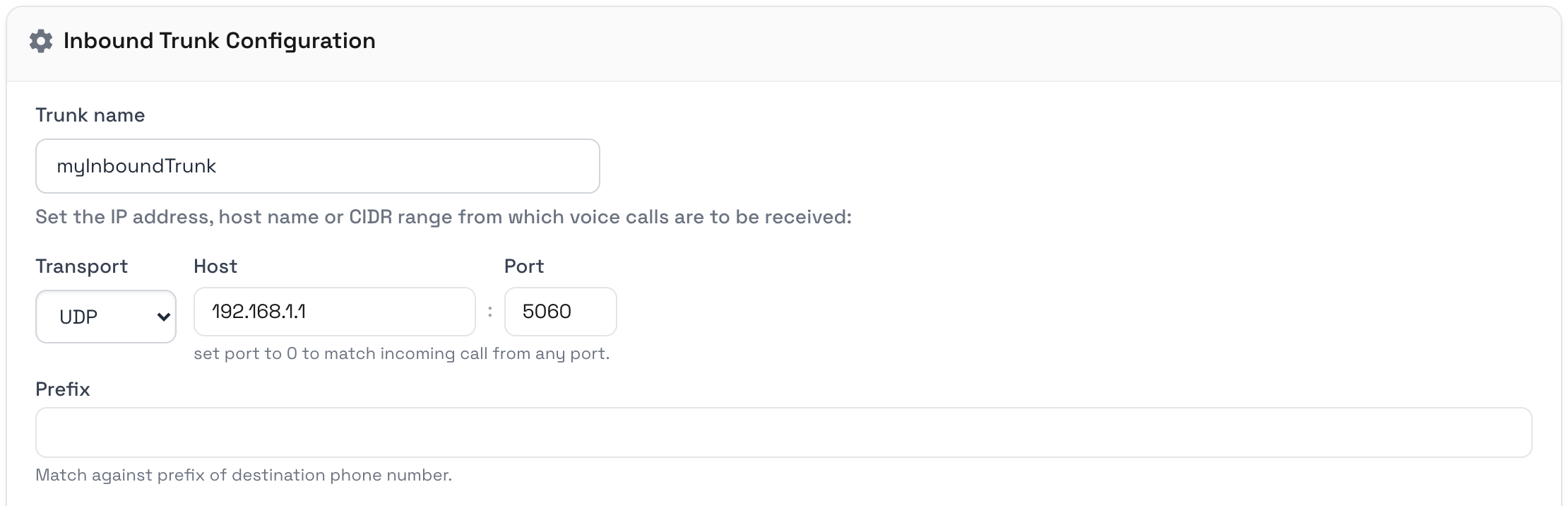
To create an inbound trunk, click the Inbound Trunks menu item of your domain, then click the Add Trunk button. Following below is a sample of the Create a new inbound trunk cockpit view:
Compatibility List
The following is a list of verified carrier networks and SIP equipment vendors that has successfully connected with
Cloudonix, as either an Inbound Trunk, Outbound Trunk or both. Each carrier or vendor includes a rating, based upon
a number of stars. The rating is based upon the number of transactions and integrations with Cloudonix performed so far.
The more stars a carrier or vendor has, the deeper and more integrations had been performed with this carrier or vendor.
Rating ranges from a single star (
Telephony Providers
In some places, Telephony Providers are also referred to as Carriers.
| Name | Type | Inbound | Outbound | Rating | Country |
|---|---|---|---|---|---|
| DIDWW | Carrier | Global | |||
| DIDX | Carrier | Global | |||
| Bezeq International | Carrier | Israel | |||
| HOT Telecom | Carrier | Israel | |||
| Partner | Carrier | Israel | |||
| Cellcom | Carrier | Israel | |||
| Halo015 | Carrier | Israel | |||
| VoiceTel | Carrier | US | |||
| Simwood | Carrier | UK | |||
| IDT Express | Carrier | US | |||
| Voxbeam | Carrier | US |
Cloud PBX
Under this category we list services such a UCaaS, CCaaS, CPaaS or any other form of business communications cloud vendor.
| Name | Type | Inbound | Outbound | Rating | Country |
|---|---|---|---|---|---|
| Twilio (via BYOC) | CPaaS | Global | |||
| Telnyx | CPaaS | Global | |||
| Plivo (via BYOC) | CPaaS | Global | |||
| SignalWire (via BYOC) | CPaaS | Global | |||
| Amazon Connect | CCaaS | Global | |||
| Freshdesk | CCaaS | Global | |||
| 3CX | UCaaS | Global | |||
| Zadarma | UCaaS | Global | |||
| Telnyx | CPaaS | Global |
Vendors
Under this category we listed open source projects, equipment vendors and/or software vendors.
| Name | Type | Inbound | Outbound | Rating | Country |
|---|---|---|---|---|---|
| Enswitch | Vendor | Global | |||
| Asterisk | Vendor | Global | |||
| Freeswitch | Vendor | Global | |||
| OpenSIPS | Vendor | Global | |||
| Kamailio | Vendor | Global | |||
| 3CX | Vendor | Global | |||
| Avaya | Vendor | Global | |||
| Cisco | Vendor | Global |
Can't find your carrier or vendor? no worries, you can still connect them to Cloudonix. The list above are the ones we know about and had performed testing with. If you would like to verify your carrier or vendor, simply contact us, using this contact form, and we'll help you verify your requirement.